Everyone automates identity.
We control whether it should happen.
JML360 is a governance control plane for Microsoft Entra environments, ensuring every identity change is approved, policy-compliant, and fully auditable before it executes.
What governed execution looks like.
HR creates a new starter
Request submitted from HR system, API, or manually
Validates policy
Access scope, permissions, and tenant boundaries checked against defined rules
JML360 routes for approval
Request sent to the right approver based on tenant policy and role scope
Account created in Microsoft Entra
Execution happens only after approval. Every step is recorded.
Nothing executes without control.
Built for MSPs and IT teams managing
Microsoft Entra environments who need:
- Approval before account creation or access changes
- Consistent policy enforcement across tenants
- Full audit of who approved what and why
- Control over scripts, automation, and HR-driven identity workflows
Where automation loses control.
Identity automation often runs faster than governance can respond.
Automation is working.
Control is not keeping up.
If any of these feel familiar, governance is the gap.
Access left active after offboarding
A leaver process fails silently. Privileged access remains active across tenants with no alert and no audit record.
Over-permissioned onboarding at scale
A joiner template grants broader access than intended. Replicated across 20 tenants before anyone notices.
No one can show who approved it
A change was made and executed. But there is no clear record of who approved it, when, or why.
Not just an automation tool.
A governed execution layer for identity.
JML360 sits between identity requests and Microsoft Entra, ensuring that nothing executes without approval, policy, and audit. Automation can still run. It just cannot run uncontrolled.
Automation makes identity changes faster.
It does not make them controlled.
| Standard Automation Tools | JML360 Governed Execution |
|---|---|
| Execute changes from triggers | Validate every change before execution |
| Apply logic broadly | Enforce tenant-aware policy and scope |
| Errors scale with automation | Approval gates stop incorrect changes |
| Logs require investigation | Decision audit shows who, what, why, when |
| Prioritise speed | Prioritise controlled execution |
Five steps. No exceptions.
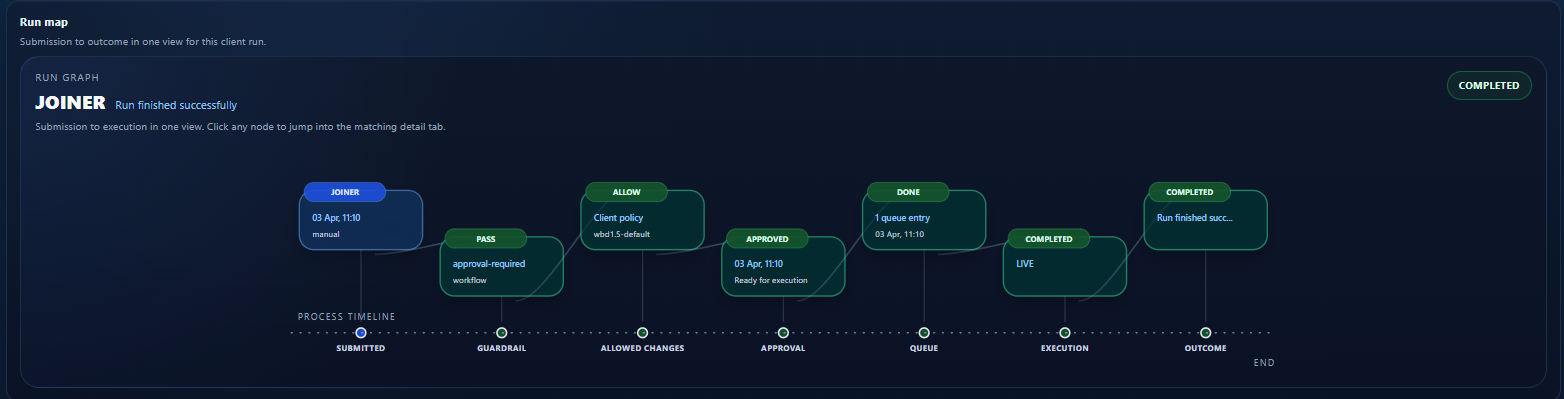
Request
A joiner, mover, or leaver request is submitted from HR, API, or manual workflow.
Every process starts with a declared intent – not an action.
Control
JML360 evaluates policy, scope, and tenant-specific rules.
Non-compliant changes are blocked before they reach execution.
Approval
Approvers review the request against governance requirements.
No change moves forward without named, explicit authorisation.
Execution
Changes are executed in Microsoft Entra only after approval.
Same input. Same output. Every time.
Audit
Every action and decision is recorded with full traceability.
Always accessible – for internal review or external audit.
Most platforms help automate identity.
JML360 helps govern execution.
Designed specifically for Microsoft Entra environments and multi-tenant MSP operations.
JML360 is not a generic IAM layer. It is built around how Microsoft Entra works at MSP scale – where identity changes are frequent, tenants are many, and the cost of ungoverned execution compounds across every client.
Works alongside the tools your team already uses – adding governance without replacing your stack.
- Microsoft Entra ID
- HR systems (BambooHR, Workday)
- Automation platforms (n8n, scripts, APIs)
- Ticketing and ITSM integrations
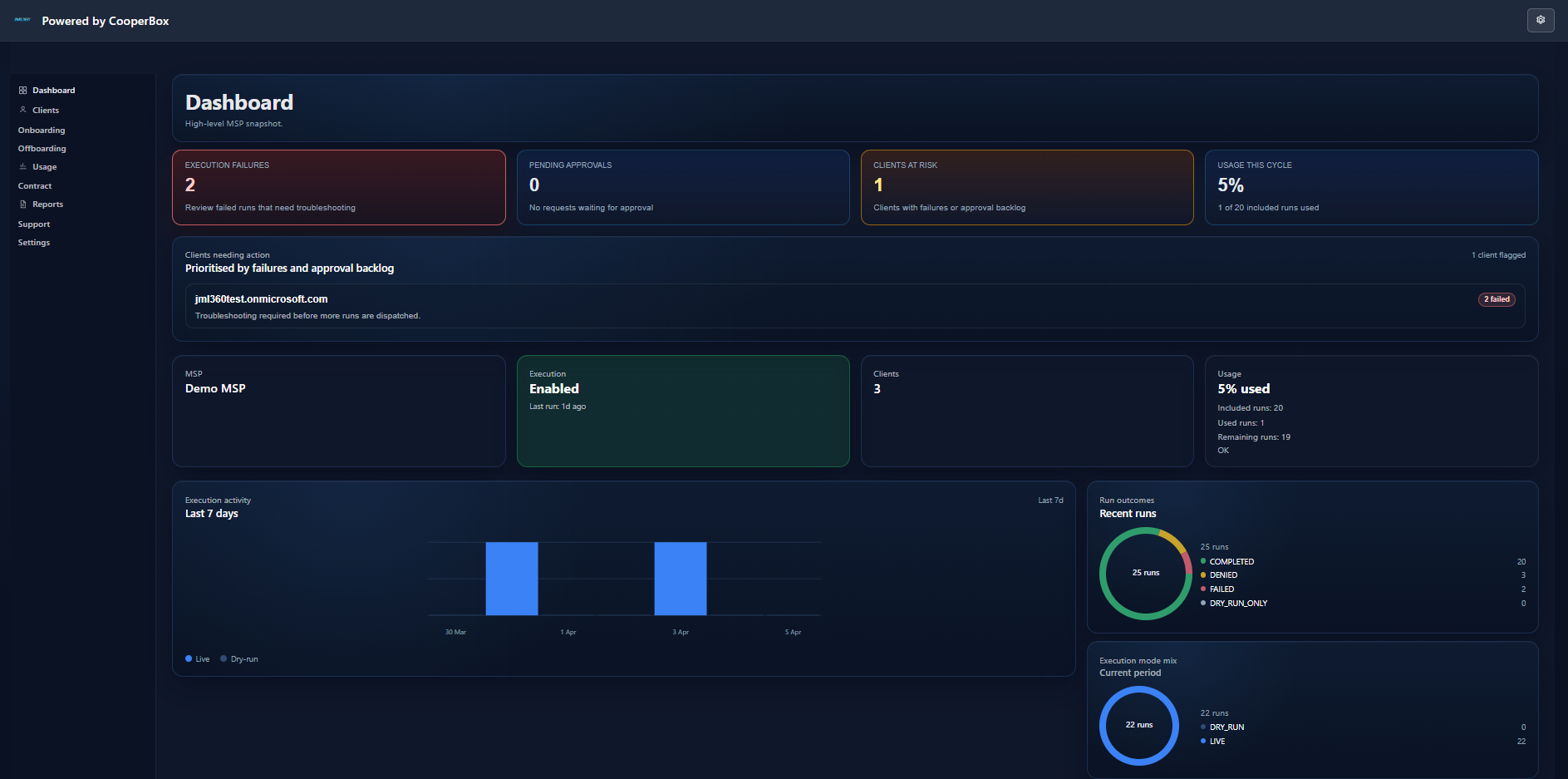
This is what governed identity operations looks like.
The JML360 dashboard gives MSPs a real-time view across every tenant – execution activity, approval queues, client risk status, and full run traceability in one place.
Governance-first. Fail-closed. Built for MSP scale.
CooperBox builds governance-first control planes for critical operations. JML360 was built by cybersecurity and identity architects who understand what happens when automation runs without control – and designed specifically to prevent it.
- Built by cybersecurity and identity architects
- Designed for MSP-scale multi-tenant operations
- Governance-first, fail-closed architecture
- Deterministic outcomes – no drift, no ambiguity
Stop executing identity changes without control.
Start governing them. See JML360 working against your actual Microsoft Entra environment – 30 minutes, no slides.