Control identity changes across Microsoft Entra tenants.
JML360 helps MSPs reduce technician overhead, standardise approvals, and manage joiner, mover, and leaver workflows with clear audit evidence.
Keep identity operations moving without letting every client, tenant, and workflow become a separate manual exception.
- Standardise joiner, mover, and leaver workflows across tenants
- Reduce governance admin time and technician workload
- Route approvals consistently before identity changes execute
- Keep audit evidence ready for client reviews and compliance checks
Built for MSPs managing Microsoft Entra environments across multiple clients.
- MSPs standardising joiner, mover, and leaver workflows across multiple tenants
- Teams who need faster onboarding and safer offboarding without adding manual friction
- Providers who want audit-ready decision evidence without hunting through tickets and logs
- Operators looking to turn identity governance into a higher-trust managed service
What controlled identity execution looks like in the real world.
A starter or leaver request comes in
From HR, a PSA workflow, an API, or a manual process
JML360 checks policy before anything runs
Tenant scope, role access, and workflow rules are evaluated up front
The right approver is routed in
Approval follows tenant rules instead of whichever engineer happened to pick up the task
Execution happens in Microsoft Entra
Only after approval, with the full decision trail recorded automatically
Your engineers still move fast. Your clients get controlled outcomes.
Identity automation gets blamed late.
Usually after the client feels the risk.
Most MSPs do not have a control layer between a request and privileged execution.
That means the first real signal is often a live client issue, a failed audit trail, or a privileged account that should have been removed already.
Automation is not the issue.
Uncontrolled execution is.
These are not edge cases. They are what MSPs live with when identity changes run without consistent control.
The “still active after offboarding” call
A leaver workflow fails silently. Access remains live. The client finds out before your process does.
The template that was too generous
A joiner template grants broader access than intended and gets repeated across multiple tenants before anyone stops it.
The audit question nobody can answer cleanly
The change happened, but your team still has to piece together who approved it, what executed, and why it was allowed.
Not another automation tool.
A control layer between request and execution.
JML360 sits between identity intent and Microsoft Entra execution so your existing automations, scripts, and workflows can keep moving without bypassing approval, policy, or audit.
Automation makes identity work faster.
JML360 makes it safer, more standardised, and easier to sell.
| Standard Automation Tools | JML360 |
|---|---|
| Run the requested change | Check whether the change should run at all |
| Rely on workflow logic alone | Enforce policy, scope, and tenant-specific approval rules |
| Scale errors quickly | Stop incorrect changes before they spread across clients |
| Leave audit evidence scattered | Provide one clear decision trail for engineers, clients, and auditors |
| Improves internal speed | Improves delivery margin and creates a client-facing control service |
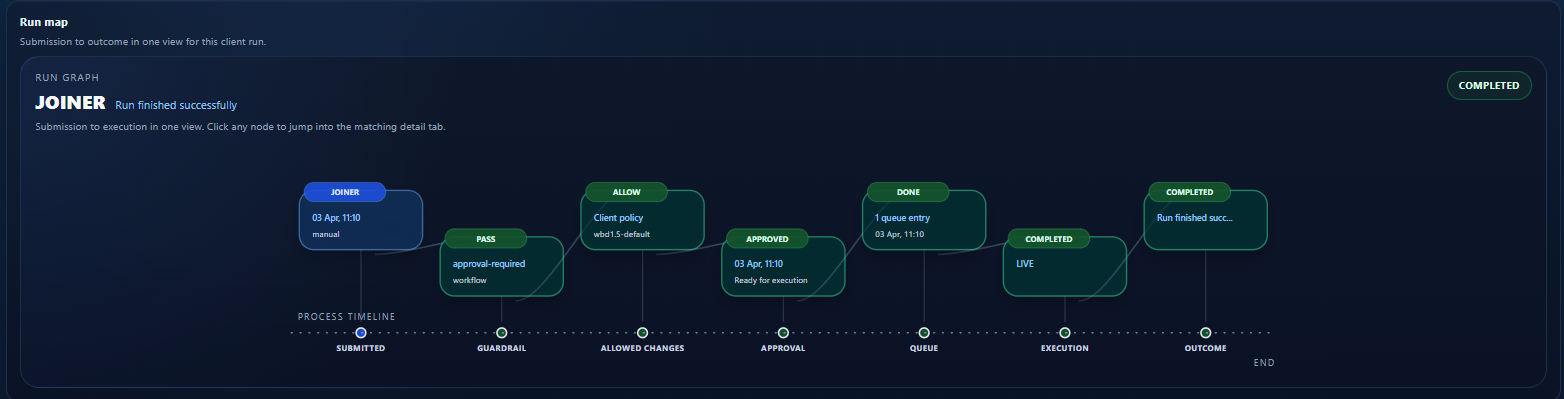
Five steps. No exceptions.
Request
A joiner, mover, or leaver request is submitted from HR, API, or a managed workflow.
Everything starts from intent, not from direct privileged action.
Policy
JML360 evaluates tenant rules, access scope, and the controls attached to that request.
Bad or out-of-policy changes are stopped before they become tickets or incidents.
Approval
The right approver is routed in based on client context and governance requirements.
Approval becomes part of the system, not a side conversation.
Execution
Changes are executed in Microsoft Entra only after approval has been captured.
Your team keeps automation speed without sacrificing control.
Audit
Every action and decision is recorded with full traceability.
The evidence is ready when a client, auditor, or engineer asks for it.
Turn identity governance into a billable service.
This is not just about reducing risk internally. JML360 gives MSPs a clear control layer they can package, defend, and sell to clients who care about trust, audits, and operational maturity.
Designed specifically for Microsoft Entra environments and multi-tenant MSP operations.
JML360 is built around how identity work actually happens in MSP environments: many tenants, frequent changes, existing automation, and real commercial pressure to stay fast without exposing clients to avoidable risk.
It works alongside the tools your team already uses, adding control without forcing you to replace your stack.
- Microsoft Entra ID
- HR systems such as BambooHR and Workday
- Automation platforms, scripts, and APIs
- Ticketing and ITSM workflows
This is the layer that lets MSPs prove control instead of just claiming it.
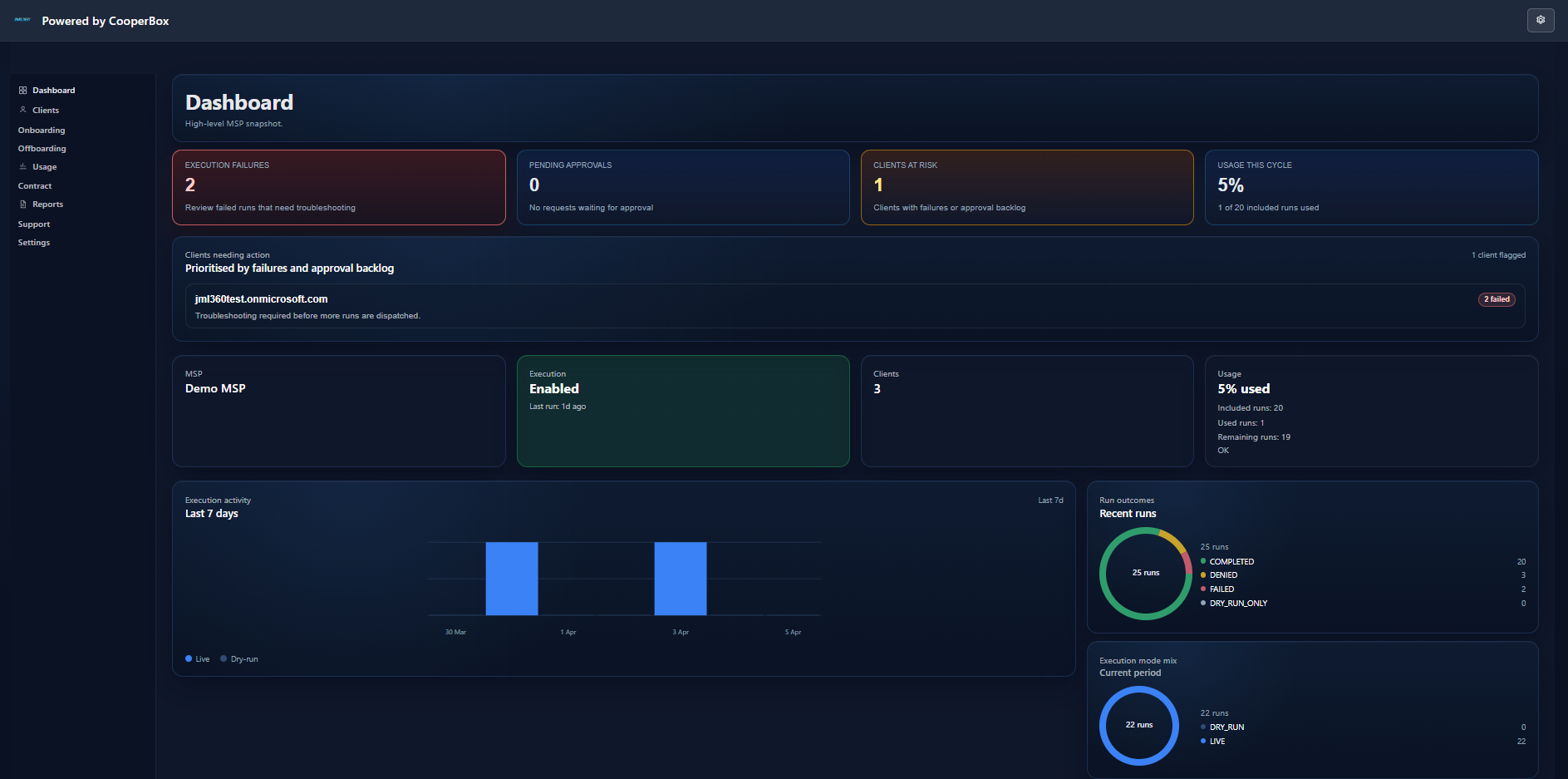
The JML360 dashboard gives your team a live view across tenants: execution activity, approval queues, client risk posture, and full run traceability in one place.
Built for identity automation risk in real MSP environments.
JML360 is a CooperBox product for MSPs working across Microsoft environments where execution speed is valuable, but uncontrolled identity automation becomes a liability fast.
CooperBox builds control layers for operations that are too important to leave to blind execution. JML360 was shaped by a simple premise: automation should reduce work for MSPs, not increase their liability.
We are working with a limited number of MSPs to shape how governed identity execution should work in live environments.
- Built by CooperBox for MSP-scale identity operations
- Designed for MSP-scale multi-tenant operations
- Fail-closed control model with deterministic outcomes
- Current design partner intake is intentionally limited
See how controlled identity operations can become a service your clients trust.
Choose the next step that matches your level of intent. Watch the platform, talk to us directly, or join the design partner program.